Two Résumés, Not One: Designed Word Templates for the Humans You Actually Meet (copy)
June 8, 2026 · 4 min read · Rod Trent
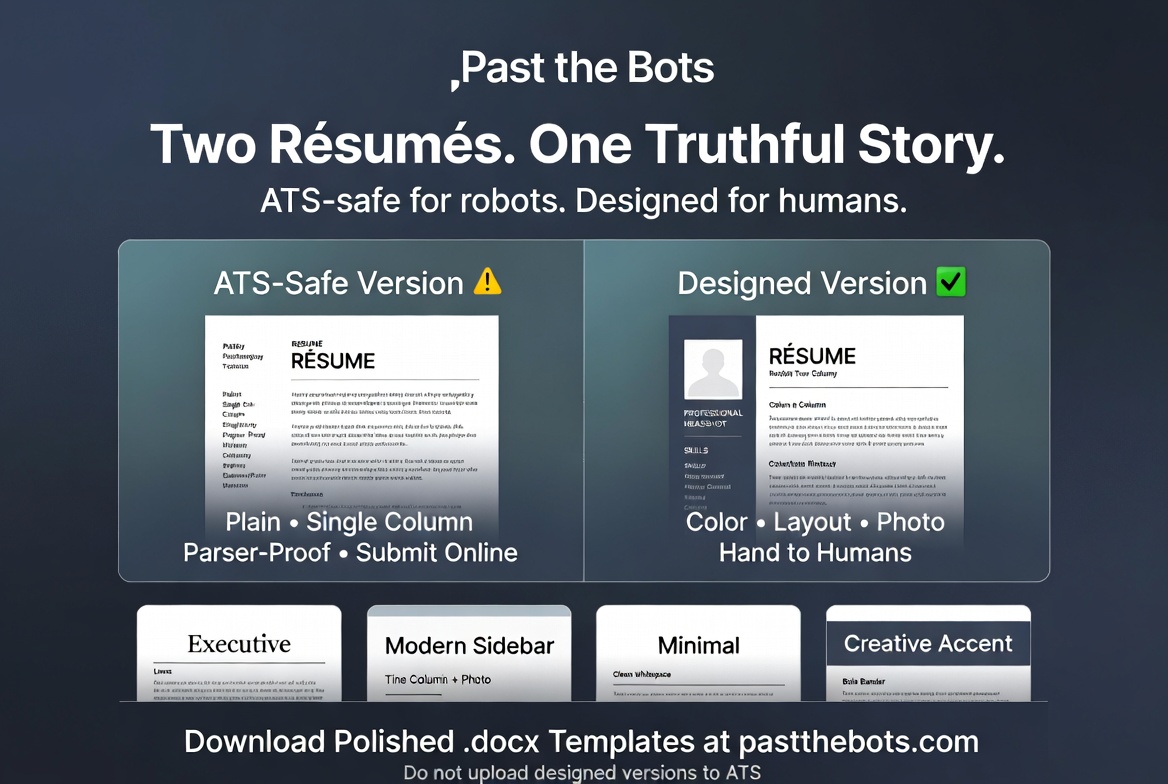 Everything I've ever written about Past the Bots comes down to one rule: make the file plain enough for the robot to read. Single column. No photos. No tables. No clever section names. The ATS-safe export exists because the machine reading your résumé first is dumber and pickier than any human, and if it can't parse your file, no person ever sees it.
All true. But it left a gap I kept hearing about.
"I'm meeting a recruiter for coffee. I'm going to a career fair. I want something on my portfolio site. Do I really hand them the stripped-down robot version?"
No. You shouldn't. A human across a table is not an applicant-tracking system, and the rules flip completely. A person likes a bit of color, a clean two-column layout, a photo that puts a face to the name. The very things that wreck ATS parsing are the things that make a résumé feel considered and real to an actual reader.
So we built the other half: designed résumé templates you can download as polished MS Word documents.
Two résumés, on purpose
This is the mental model I want you to take away: you should have two versions of your résumé, and they do different jobs.
- The ATS-safe version — plain, single-column, parser-proof. This is the one you submit. Online applications, job boards, anything that gets uploaded and screened. It already lives in the export you know.
- The designed version — color, layout, optional photo. This is the one you hand to a human. In-person interviews, networking, career fairs, your portfolio, an intro email to someone who already knows your name.
Same truthful content. Two completely different delivery formats, because they're read by two completely different kinds of reader. We even put a loud warning on the designed panel: do not upload these to an online application. The design that charms a person will confuse a bot.
Four templates, pick your lane
You'll find these on the Print version tab after you run a scan. There are four looks, each tuned for a different kind of role:
- Executive — centered serif with ruled section dividers. Built for finance, legal, operations, and senior or C-suite roles where understated authority is the point.
- Modern sidebar — a tinted left column for your photo, contact details, and skills. The classic "designed" two-column résumé, and a strong default for most roles.
- Minimal — clean sans-serif, generous whitespace, a subtle accent. A safe, modern all-rounder for any industry.
- Creative accent — a bold color banner with photo and accent headings. For design, marketing, startups, and creative roles where a little personality helps.
Every template is a real .docx, built on fonts Word actually ships with, so it opens and renders correctly on any machine — no broken layouts, no missing-font surprises when your contact opens it.
Make it yours: headshot + accent color
Two touches that matter for the human-facing version:
- Optional headshot. Upload a photo and it's placed cleanly into the templates that support one. Optional on purpose — in plenty of markets a photo is expected, in others it's a faux pas, so it's always your call. (And to be clear: you'd never put a photo on the ATS version. This is exactly why these live apart.)
- Accent color. Pick from a tasteful palette — navy, blue, teal, emerald, plum, burgundy, slate, charcoal — to match your field or just your taste. It defaults to a professional navy if you'd rather not think about it.
Same line we never cross
The designed templates change how your résumé looks, never what it says. They're a formatting layer on top of the exact same structured content the rest of Past the Bots works with — the content you've already made truthful and tailored. We don't invent experience to fill a prettier layout any more than we'd invent it for a bot.
Who gets them
Designed templates are part of the premium toolkit, gated behind the same .docx export entitlement as the rest of it — so they're included with the Job-Hunt Pass and with Career Care, the year-round plan. If you're already on either, they're waiting on the Print version tab right now.
And as always, the audit is free with no signup. If you've never watched a parser try to read your current résumé, start there: run it at /audit, fix what's broken for the bots, then come grab a designed version for the humans.
Two résumés. One truthful story. The right format for whoever's reading.
Past the Bots is the ATS résumé toolkit at pastthebots.com. The audit is always free, no signup.