A Résumé That Keeps Up With You: Version History, a Career Log, and a Heads-Up When It Falls Behind
October 21, 2026 · 8 min read · Rod Trent
Quick question: what did you ship in March?
If you had to stop and think, you're in good company. Almost everyone updates their résumé the same way: once, in a hurry, usually years after the work happened, trying to reconstruct what they did from old calendar invites and half-remembered wins. The best stuff never makes it in. The numbers are fuzzy. And the job you're applying for gets a résumé that describes who you were two roles ago.
Past the Bots has always been about the moment you apply: what the screening software sees, how well you match the job, and how to tailor it honestly. Today we're shipping the other half, the time between searches. The goal is simple: your résumé should keep up with your work, a little at a time, so it's ready the day the right role shows up.
Here's everything that's new.
My Résumé: one master copy, every version saved
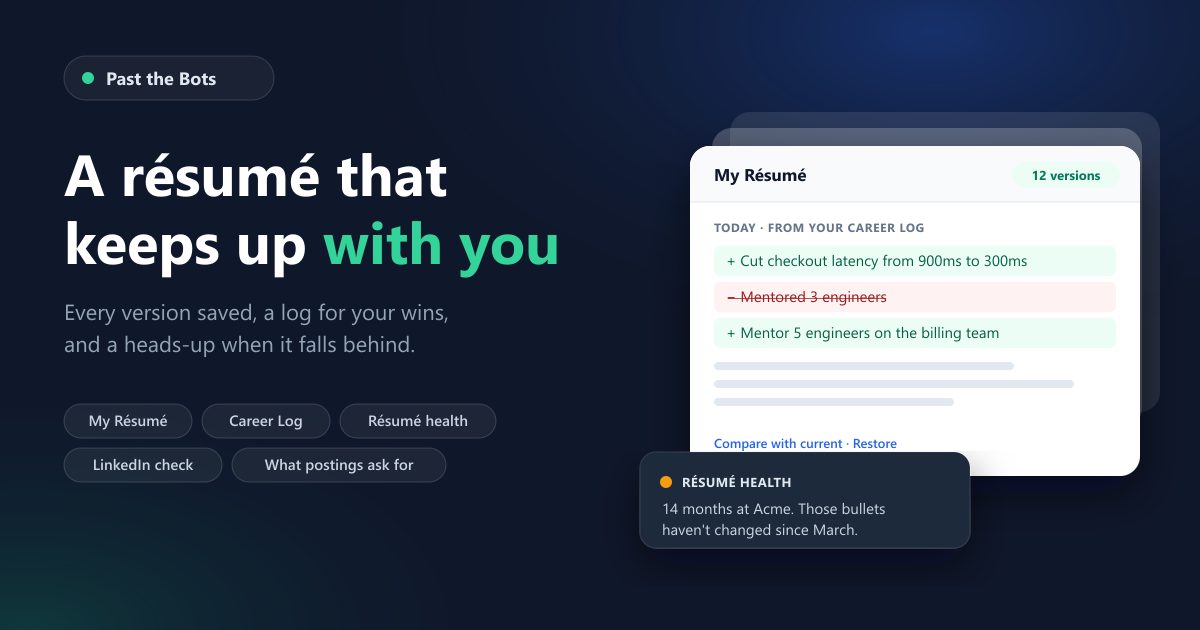
My Résumé (it lives at /vault, and it's in the menu once you're signed in) holds one master résumé for your account. Every time you save, it keeps a version, with an optional note about what changed.
- See what changed. Compare any old version with your current one, line by line.
- Roll back without losing anything. Restoring an old version makes it current again and keeps everything in between.
- Tailored copies stay linked. When you tailor your résumé to a job and save it, the copy remembers which version of your master it came from. Update the master later and the copy tells you so: "Your master changed since this was tailored."
- The live editor saves to your account. Open your résumé in the editor, and unsaved edits are kept as a draft that follows you to another device. Save a version when you're happy.
- It's yours. Download everything as a file anytime, or delete one copy or all of it.
You can start your master from an upload, from the editor, from your last scan, or by pasting text. It's free with an account.
The Career Log: write the win down when it happens
The Career Log (at /log) is the simplest thing we've built and maybe the most useful. When you ship, fix, grow, or learn something, write a line. Pick what kind of thing it was (a win, a number, a certification, a promotion, a new role) and the month it happened. That's it.
If you want a nudge, turn on the check-in email. On the 1st of the month (or every three months, your choice), one short email asks what's worth remembering from the month that just ended. Each button in it opens a page where you can add a line without signing in. Those links are signed, expire in two weeks, and can only add to your log. They can't show you, or anyone else, what's already in it.
It's free, and the email is off until you turn it on.
From your notes to your résumé
A log is only useful if it ends up on the résumé, so there are two ways to get it there:
- Add it as you wrote it. Pick the job it belongs to and your words go in as a new bullet, as a new version of your master. Free.
- Let AI draft the bullets. Select a few entries and AI turns them into résumé bullets, placed under the right job. This is where I was careful. The AI is told to use only what you wrote, and then a separate check that isn't AI at all reads every draft. If a bullet contains a number, a skill, or a name that isn't in your notes or already on your résumé, it's thrown out before you ever see it. You'll just see a line like "We threw out 1 draft that included a detail you didn't log." You pick which drafts to keep, and they land as one new version you can compare or undo.
The AI drafting is part of the Job-Hunt Pass and Career Care, or one credit.
Résumé health: told when it's behind, and why
I didn't want to build a nag. So Résumé health, the card at the top of My Résumé, only speaks up when there's a specific reason, and it always says the reason:
- "You've been at Acme for 14 months, and what your résumé says about it hasn't changed since March."
- "Two years at Acme this month. A good time to add what changed."
- "You've logged 4 things in your Career Log that aren't on your résumé yet."
- "Your résumé hasn't changed since January."
- "Your LinkedIn profile and résumé haven't been compared since April."
Each one comes with a single thing to do. If it can't read your current job clearly, it says nothing about it rather than guess. You can also have these come by email: opt in, at most one email a month (folded into the check-in when one is due), and never the same reason twice in three months unless something about it changed.
LinkedIn vs. your résumé
LinkedIn doesn't let apps read your profile, so there's no "connect LinkedIn" button here, and I'd be suspicious of any tool that claims one. What you can do is download your own profile and compare it. On the LinkedIn page, upload LinkedIn's "Save to PDF" from your profile, or the data export you can request in LinkedIn's settings. Past the Bots shows you where the two disagree:
- A new job on one but not the other
- Different titles or dates for the same job
- A headline that doesn't mention your current title
- Skills listed in only one place
Each item comes with a fix: a line to copy into your résumé, or text to paste into LinkedIn. The next time you compare, it also tells you what changed on LinkedIn since last time.
A note on privacy, because LinkedIn's data export contains a lot more than your profile: the export is opened in your browser. Only your roles, skills, and headline are sent to us. Your messages, connections, and everything else in that archive never leave your device. It's free.
What postings ask for
The last piece looks outward. Every day we pull real job listings into our job feed, from public company job boards and a few aggregators. We now count which skills show up in those postings, by kind of role, month by month. On My Résumé you'll see, for the role you're aiming at:
- Skills that show up in at least 30% of postings but aren't on your résumé
- Skills that are showing up more than they did three months earlier
- Skills on your résumé that are showing up less
Two promises here. First, it always tells you where the numbers come from and over what window (for example, "from 1,240 engineering postings in our job feed, August to October"), and it never says "the market wants." It's our feed, not the whole job market. Second, it frames every gap the way the rest of the product does: add it if you have it, and here's a place to learn it if you don't.
One honest caveat: this needs data to be worth anything, so nothing is shown for a kind of role until we've counted at least 100 of its postings. We started counting today, so for a while many people will see "there isn't enough to say yet." That's on purpose.
Free accounts see how many common skills are missing and one example. The full report, and an alert when two or more common skills turn up missing, are part of the Job-Hunt Pass and Career Care.
What's free, and what isn't
Free with an account: My Résumé with full version history, the Career Log and check-in email, adding log entries as written, Résumé health and its alerts, the LinkedIn comparison, and a preview of what postings ask for.
Job-Hunt Pass ($29 for 3 months) and Career Care ($8 a month): AI bullets from your Career Log, the full postings report and its alert, plus everything that was already in them.
If you've ever wondered what Career Care is for, this is the answer. The Pass is for a search. Career Care is for the rest of the time, when you're happily employed and your résumé is quietly falling behind.
The boring promises
A few things that don't make for exciting screenshots but matter to me:
- Every email has a one-click unsubscribe, and nothing is sent unless you turned it on.
- Deleting your account erases everything we store for it, including your résumés, your log, and your saved LinkedIn summary, and cancels any subscription so you're not billed for an account you can't sign in to.
- The original text of your résumé is stored only when you save it to My Résumé, and it stays until you delete it. (Signed-in scans keep their results, like scores and the ATS-safe rebuild, in My Scans, which you can also delete anytime.)
Try it
- Save your résumé to My Résumé (from a scan, the editor, or a paste).
- Write one thing in the Career Log. The last thing you were proud of at work, even if it was small.
- Turn on the check-in if you'd like a nudge on the 1st.
That's the whole habit. A line now and then, and a résumé that's ready when you are.
Past the Bots is the ATS résumé toolkit at pastthebots.com. Checking your résumé, My Résumé, and the Career Log are free with an account.