More Applications, More AI Screening: Why Your Résumé Parser Still Matters in 2026
October 25, 2026 · 4 min read · Past the Bots
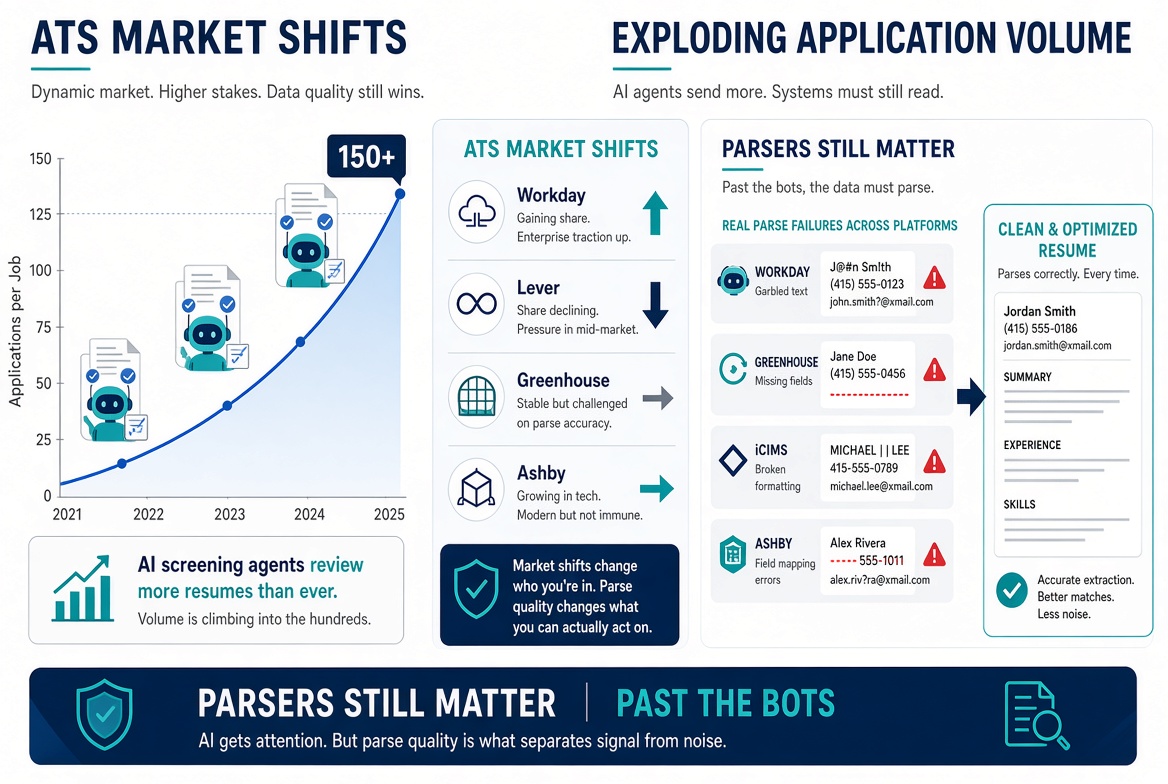 The numbers are a little brutal right now. Greenhouse is reporting average application volumes in the hundreds per open role, and interview conversion rates have dropped into the low single digits in some datasets. Meanwhile, Workday has been quietly gaining ATS market share year over year while platforms like Lever have pulled back. And every major ATS vendor, from iCIMS to Ashby, has been shipping AI screening agents that filter candidates before a human ever opens a tab.
All of which means one thing for job seekers: more of your applications are being read by machines, and the machines are not all reading the same way.
The ATS Landscape Is Not Monolithic
It's tempting to think of "the ATS" as a single thing to optimize for. It isn't. Workday, Greenhouse, iCIMS, Ashby, Lever, and Taleo each have their own parser under the hood, and they make meaningfully different decisions about what to extract and what to ignore.
Here are some concrete examples of where parsers diverge:
- Column layouts. A two-column résumé with your skills in a left sidebar looks clean in Word or Google Docs. In Workday's parser, that sidebar often gets read last, completely out of order, or dropped. Your "Python, SQL, Tableau" becomes noise.
- Tables. iCIMS and some older Taleo instances struggle with tables. Skills or job titles inside a table cell may not map to the right field in the candidate profile.
- Headers and section labels. Greenhouse is generally solid with standard section names like "Experience" and "Education." Use something creative like "Where I've Made an Impact" and some parsers will either skip the section or misclassify the content.
- Date formats. Parsers calculate tenure from your dates. "Jan 2021 to Present" usually works. "01/21 - now" is ambiguous and occasionally breaks duration calculations, which can affect how you rank in filtered searches.
- Inline contact info. Putting your LinkedIn URL or phone number inside a header text box in Word is a common formatting move. Many parsers cannot read text boxes at all, so your contact details simply vanish from the parsed record.
Why This Matters More as Volume Climbs
When a recruiter is sifting through 300 applications, they are not hand-checking parsed profiles for accuracy. The ATS-generated candidate card is what they see. If your title parsed wrong, your tenure looks short, or your core skills didn't land in the skills field, you are functionally invisible before anyone reads a single bullet.
The new AI screening agents make this worse, not better. These tools query the structured data the parser already extracted. If the extraction failed, the AI agent is working from a corrupted picture of your experience.
The fix is not to game the system. The fix is to give the parser nothing to fail on.
What a Clean, Parser-Friendly Résumé Actually Looks Like
A few rules that hold across virtually every major ATS:
- Single column, no text boxes, no tables. Boring to look at, reliable to parse.
- Standard section headings. Experience, Education, Skills, Summary. The classics work.
- Spelled-out dates. "March 2022 to Present" beats "3/22 - current" every time.
- Contact info in the body of the document, not in a header or footer.
- Save as .docx, not .doc or PDF, unless the job posting specifically asks for PDF. Many ATS platforms parse .docx most accurately.
- Don't abbreviate job titles. "Sr. SWE" might mean something to you. Write "Senior Software Engineer."
See What the Parser Actually Sees
The challenge is that you cannot eyeball a résumé and know how it will parse. A document can look flawless and still feed garbage into the ATS record.
That's exactly the problem Past the Bots is built to solve. The Audit the Bots tool shows you how different parsers actually read your résumé, including what gets extracted into name, contact, skills, and section fields, and where things go wrong. You get flagged issues sorted into critical, warning, and OK categories so you know what to fix first.
If your résumé has a two-column layout or contact details in a header, you'll see the parse failure in plain language, not just a vague score.
The Bottom Line
Application volume is high and it is probably not going back down. AI screening is real and it is getting more common. But the foundation of all of it is still the parser, and parsers still fail on the same formatting mistakes they always have.
Before you tailor another cover letter or tweak another keyword, make sure the basic structured data in your résumé is landing correctly. That is the part that filters you in or out before anyone reads a word.