Why Your Résumé Looks Great to Humans but Dies in the ATS
September 22, 2026 · 4 min read · Past the Bots
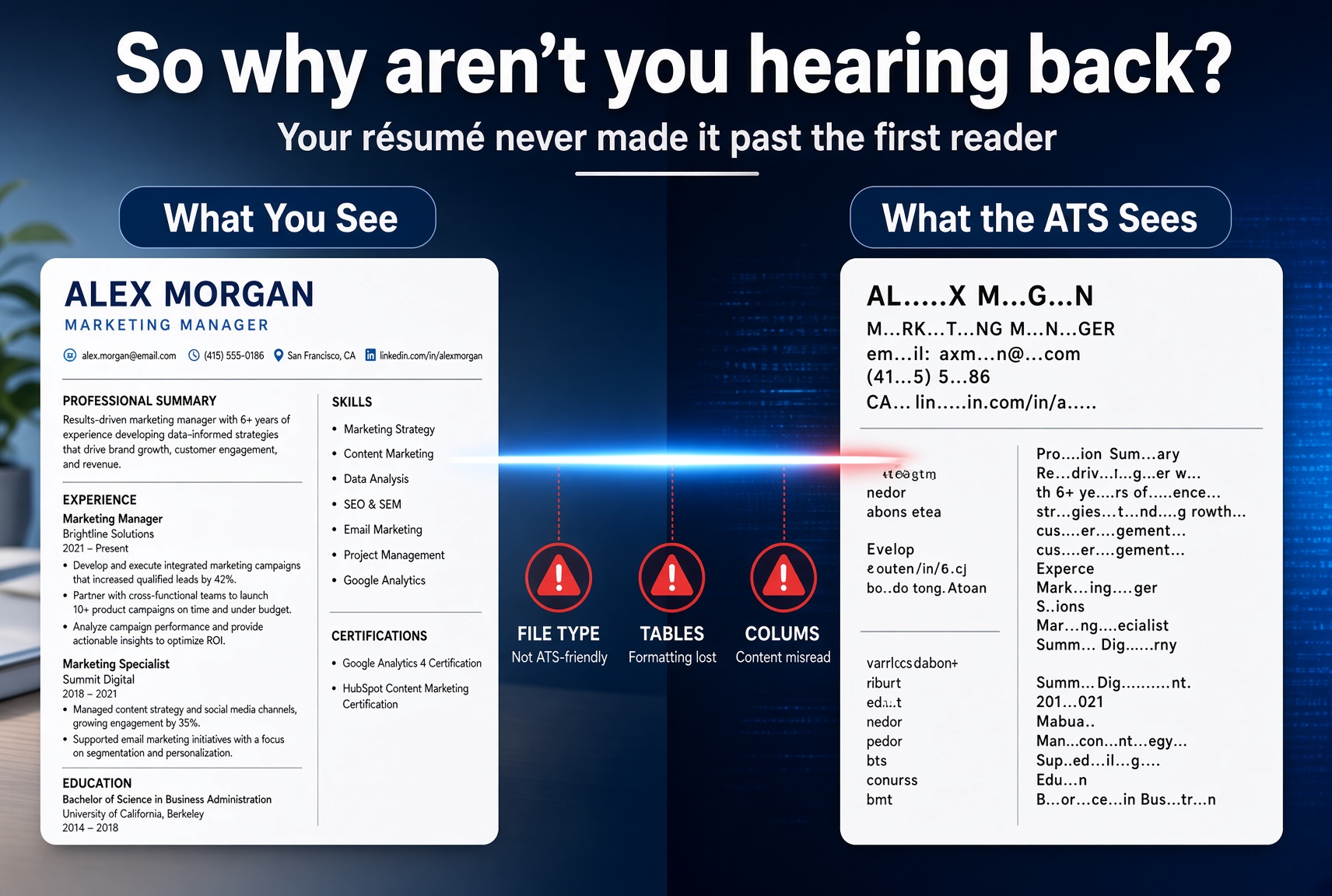 You spent hours on your résumé. The layout is clean, the font is sharp, and a recruiter who actually reads it would probably love it. So why aren't you hearing back?
For a lot of job seekers, the problem isn't the content. It's that the résumé never makes it past the first reader, which isn't a human at all. It's an Applicant Tracking System, and it reads documents very differently than your eyes do.
Here are the most common silent killers that make a great-looking résumé fail the ATS test.
The File Type Problem
This one is easy to overlook. PDFs look polished and preserve your formatting perfectly, which is exactly why people use them. But many older ATS platforms parse PDFs poorly or not at all. The text gets scrambled, columns merge into one long run-on string, or the file gets flagged as unreadable.
The safer default is .docx. Most modern ATS platforms handle Word documents more reliably. If a job posting doesn't specify a format, .docx is usually the better bet. When in doubt, submit both if the system allows it.
Tables, Text Boxes, and Columns
This is the big one. Design tools like Canva and even Word templates love multi-column layouts, sidebar sections for skills, and text boxes for contact info. They look sharp on screen. But to an ATS, a text box is often completely invisible, and a two-column layout gets read left-to-right across both columns at once, turning your bullet points into gibberish.
Imagine your résumé getting parsed like this:
- Project Manager | Skills: Python, SQL, Agile becomes Project Manager Skills: Python SQL Agile | 2019-2023 Expert Expert Intermediate
The system has no idea what it's looking at. Your contact details might vanish entirely if they're in a header or text box.
Stick to a clean single-column layout with no tables or text boxes. It's less flashy, but it gets read correctly.
Section Headers the ATS Doesn't Recognize
ATS platforms are trained to look for specific section labels. They expect "Work Experience," "Education," "Skills," and "Summary." When you get creative with labels like "My Journey," "Where I've Been," or "What I Bring," the system may not categorize that section at all.
That means your job titles, employers, and dates could end up floating in an unstructured void, or worse, get skipped entirely during parsing.
Use conventional, boring section headers. This is one of those times where being a little predictable actually pays off.
Keyword Gaps (and Keyword Stuffing)
ATS platforms score résumés partly by matching your text against the job description. If the posting says "cross-functional collaboration" and your résumé says "worked with different teams," those might mean the same thing to a human. To a parser, they're completely different strings.
The fix isn't to paste the job description into your résumé in white text (that trick is dead and sometimes flagged as fraud). The fix is to genuinely mirror the language in the job posting where it accurately reflects what you did.
At the same time, cramming in keywords without context hurts your score too. Modern ATS platforms are smarter than they used to be, and recruiters who do eventually read your résumé will notice if it reads like a keyword list.
Aim for relevant keyword density, not keyword stuffing. Match the language of the role, and make sure each keyword lives inside a real accomplishment.
How an ATS Health Score Exposes These Problems
The frustrating thing about all of these issues is that they're invisible when you look at your résumé normally. Everything looks fine in your PDF viewer. You'd never know your contact info is trapped in a text box or that your Skills section is being ignored.
That's what an ATS scan is actually for. Tools like the audit inside Past the Bots parse your résumé the way a real ATS would and show you exactly what gets extracted: your name, email, phone number, job titles, dates, and skills. If any of those come back blank or garbled, you know exactly what to fix before you apply.
A health score surfaces issues in plain language: critical problems that likely disqualify you, warnings worth addressing, and things that are fine. It takes the guesswork out of something that's otherwise completely opaque.
The Bottom Line
A résumé that wows humans but confuses machines is only doing half its job. The fixes are usually straightforward once you know where to look:
- Use .docx format when format isn't specified
- Drop the multi-column layout and text boxes
- Use standard section headers
- Mirror job description language naturally inside real bullet points
- Run an ATS scan to see what's actually being extracted
None of this means your résumé has to be boring. It means the structure needs to be machine-readable first, so a human actually gets the chance to be impressed by it.